


The timeline your agent can edit.Not a chat box.AI video editor for agents & humans
Built for the agents you already use











Edit video like a document
Delete a sentence from the transcript and the cut happens. No scrubbing, no hunting for the edit point.
Point at your words, get footage
Tag a phrase in your own transcript and the generated clip lands on the timeline already locked to it.
Ten times fewer clicks
Cutting filler words by hand means finding every one, selecting it, deleting it, then closing the gap. Saying it once does all of them.
Locate each filler, select the span, ripple delete, verify the join. Repeated 34 times.
“Cut every filler word, then tighten the pauses.” The agent resolves the spans and does the rest.
Review that never points at nothing
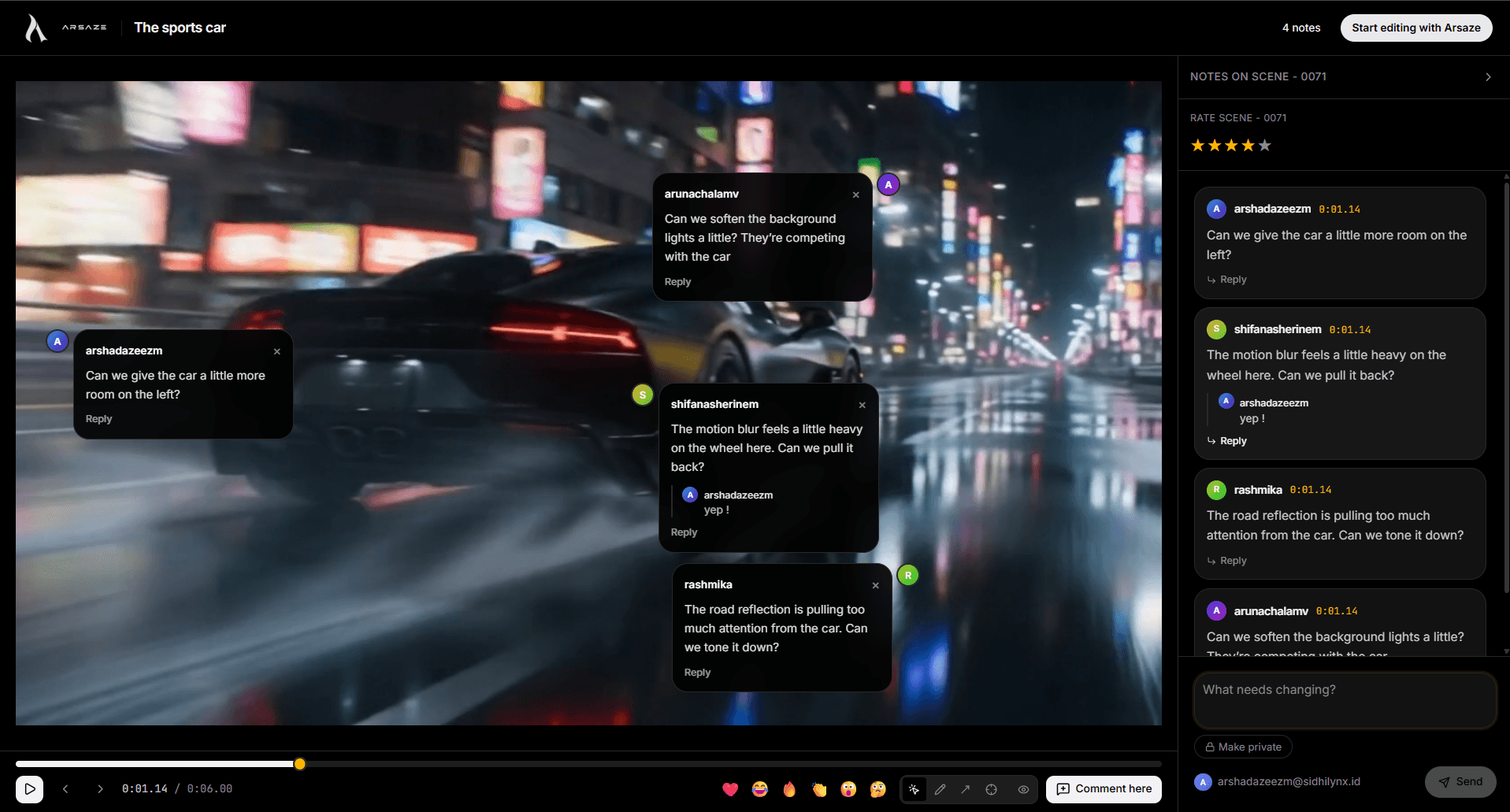
Comments anchor to a commit, a timestamp and a clip — so feedback survives the next edit instead of quietly rotting.
A real video editor, whether you drive it or your AI does.
Every tool below works by hand on the timeline, and every one is also a tool your AI can call.
Auto captions
Word-timed captions in styles you can reuse across a project, editable like any other clip.
Cut silences and filler words
Remove dead air and ums from a talking-head recording in one pass, then fine-tune on the timeline.
AI b-roll and generation
Generate b-roll, video, images, voiceover, music and sound effects straight onto the timeline.
Color grading
Color wheels, curves, HSL secondaries and LUTs, plus matching one shot's look to another.
Clean audio
Voice isolation, noise reduction, loudness normalization and automatic ducking under speech.
Version history
Every edit is versioned as it happens. Branch, compare and go back to any earlier cut.
Client review
Share a review link; comments land on the exact frame and the exact version they're about.
Export anywhere
MP4 from the cloud, free local exports on Windows, or FCPXML for DaVinci Resolve and Premiere Pro.
FAQ
No. It's a full manual NLE — timeline, trim modes, color wheels, keyframes. The agent is an operator you can hand the controls to, not a requirement.
Every edit is versioned automatically as it happens, so you can step back to any earlier state. Nothing the agent does is one-way.
Claude, ChatGPT and Grok are supported today over MCP. You add Arsaze as a custom connector, pick a project, and its tool calls play back live in your editor.
Not without your consent. Your uploads, generated video and voice models stay tied to your account — see the privacy policy for the full detail.
No. Exports render on our servers by default, so the editor is just a browser tab. If you'd rather use your own PC, the Windows app can export locally — free, with no watermark.
Yes. Export a finished MP4 whenever you want, or export the edit as an FCPXML project that opens in DaVinci Resolve and Premiere Pro with your cuts, transitions and captions intact.
There's a free plan to start. Paid plans add AI credits and cloud export hours, and credit top-ups never expire. Exports rendered on your own PC with the Windows app are always free.